Python 编程与环境笔记:系列目录
1.语法和空格 注释 数字和运算 字符串处理 列表、元组和字典 JSON 循环 文件处理 函数 处理日期时间 NumPy Pandas
要运行单元格,请按 Shift+Enter 或单击页面顶部的 Run (运行)。
Python 使用缩进空格来指示语句的级别。下面的单元格是一个示例,其中 ‘if ’ 和 ‘else ’ 处于同一级别,而 ‘print ’ 由空格分隔到不同级别。相同级别的项目的间距应相同。
1
2
3
4
5
student_number = input ("Enter your student number:" ) if student_number != 0 : print ("Welcome student {}" .format (student_number)) else : print ("Try again!" )
1
2
3
4
Enter your student number: 1 Welcome student 1
在 Python 中,注释以井号 ‘# ’ 开头并延伸至该行的末尾。’# ’ 可以在行的开头或代码之后。
1 2 3 4 print ("Hello world!" ) print ("# 在本例中不是注释" )
与其他编程语言一样,有四种类型的数字:
由 int 表示的整数(例如 1、20、45、1000) 由 float 表示的浮点数(例如 1.25、20.35、1000.00) 长整数 复数(例如 x+2y,其中 x 是已知的) 运算 结果 x+y x 与 y 的和 x - y x 与 y 的差 x * y x 与 y 的乘积 x / y x 和 y 的商 x // y x 和 y 的商(取整) x % y x / y 的余数 abs(x) x 的绝对值 int(x) 将 x 转换为整数 long(x) 将 x 转换为长整数 float(x) 将 x 转换为浮点 pow(x, y) x 的 y 次方 x ** y x 的 y 次方
1 2 3 4 5 6 a = 5 + 8 print ("Sum of int numbers: {} and number format is {}" .format (a, type (a)))b = 5 + 2.3 print ("Sum of int and {} and number format is {}" .format (b, type (b)))
1 2 Sum of int numbers: 13 and number format is <class 'int'> Sum of int and 7.3 and number format is <class 'float'>
与其他编程语言一样,Python 具有丰富的字符串处理功能。
1 2 3 4 5 6 7 8 9 10 11 12 13 14 15 16 17 18 19 20 21 22 23 test_word = "hello world to everyone" print (test_word)print (test_word[0 ])print (len (test_word))print (test_word.count('l' )) print (test_word.find("o" )) print (test_word.count(' ' )) print (test_word.upper()) print (test_word.lower()) print (test_word.replace("everyone" ,"you" )) print (test_word.title()) print (test_word + "!!!" ) print (":" .join(test_word)) print ("" .join(reversed (test_word)))
1 2 3 4 5 6 7 8 9 10 11 12 13 hello world to everyone h 23 3 4 3 HELLO WORLD TO EVERYONE hello world to everyone hello world to you Hello World To Everyone hello world to everyone!!! h:e:l:l:o: :w:o:r:l:d: :t:o: :e:v:e:r:y:o:n:e enoyreve ot dlrow olleh
Python 支持数据类型列表、元组、字典和数组。
通过将所有项目(元素)放在方括号 [ ] 内并以逗号分隔来创建列表。列表可以具有任意数量的项目,并且它们可以具有不同的类型(整数、浮点数、字符串等)。
1 2 3 4 5 6 my_list = [] first_list = [3 , 5 , 7 , 10 ] second_list = [1 , 'python' , 3 ]
1 2 3 nested_list = [first_list, second_list] nested_list
1 [[3, 5, 7, 10], [1, 'python', 3]]
1 2 3 combined_list = first_list + second_list combined_list
1 [3, 5, 7, 10, 1, 'python', 3]
1 2 3 combined_list.append(600 ) combined_list
1 [3, 5, 7, 10, 1, 'python', 3, 600]
1 2 3 for item in combined_list: print (item)
元组类似于列表,但是您可以将其与括号 ( ) 一起使用,而不是与方括号一起使用。主要区别在于元组不可变,而列表可变。
1 2 my_tuple = (1 , 2 , 3 , 4 , 5 ) my_tuple[1 :4 ]
字典也称为关联数组。字典由键值对的集合组成。每个键值对将键映射到其关联值。
1 2 desk_location = {'jack' : 123 , 'joe' : 234 , 'hary' : 543 } desk_location['jack' ]
JSON 是用 JavaScript 对象表示法编写的文本。Python 有一个名为 json 的内置程序包,可用于处理 JSON 数据。
1 2 3 4 5 6 7 8 9 10 import jsonx = '{"first_name":"Jane", "last_name":"Doe", "age":25, "city":"Chicago"}' y = json.loads(x) print ("Employee name is " + y["first_name" ] + " " + y["last_name" ])
1 Employee name is Jane Doe
If, Else, ElIf 循环 :和其他任何编程语言一样,Python 支持条件语句。Python 依靠缩进(行的开头是空格)来定义代码范围。
1 2 3 4 5 6 7 8 9 10 11 12 13 14 15 16 17 18 19 a = 22 b = 33 c = 100 if a > b: print ("a is greater than b" ) else : print ("b is greater than a" ) if a > b: print ("a is greater than b" ) elif b > c: print ("b is greater than c" ) else : print ("b is greater than a and c is greater than b" )
1 2 b is greater than a b is greater than a and c is greater than b
While 循环 :只要条件为 true,就执行一组语句
1 2 3 4 5 6 7 8 9 10 11 12 13 14 15 16 17 18 i = 1 while i < 10 : print ("count is " + str (i)) i += 1 print ("=" *10 )x = 0 while x < 5 : x += 1 if x == 2 : continue print (x) else : print ("x is no longer less than 5" )
1 2 3 4 5 6 7 8 9 10 11 12 13 14 15 count is 1 count is 2 count is 3 count is 4 count is 5 count is 6 count is 7 count is 8 count is 9 ========== 1 3 4 5 x is no longer less than 5
For 循环: For 循环更像 Python 中的迭代器。For 循环用于遍历序列(列表、元组、字典、集合、字符串或范围)。
1 2 3 4 5 6 7 8 9 10 11 12 13 14 15 16 17 18 19 20 21 22 23 24 25 26 fruits = ["orange" , "banana" , "apple" , "grape" , "cherry" ] for fruit in fruits: print (fruit) print ("\n" )print ("=" *10 )print ("\n" )for x in range (1 , 10 , 2 ): print (x) else : print ("task complete" ) print ("\n" )print ("=" *10 )print ("\n" )traffic_lights = ["red" , "yellow" , "green" ] action = ["stop" , "slow down" , "go" ] for light in traffic_lights: for task in action: print (light, task)
1 2 3 4 5 orange banana apple grape cherry
1 2 3 4 5 6 7 8 9 red stop red slow down red go yellow stop yellow slow down yellow go green stop green slow down green go
在 Python 中处理文件的主要函数是 open() 函数。open() 函数使用两个参数:filename 和 mode。
打开文件有四种不同的方法(模式):
“r” - 读取 “a” - 追加 “w” - 写入 “x” - 创建 此外,您还可以指定是以二进制还是文本模式处理文件。
1 2 3 4 !echo "This is a test file with text in it.This is the first line." > test.txt !echo "This is the second line." >> test.txt !echo "This is the third line." >> test.txt
1 2 3 4 5 6 7 8 9 10 11 12 13 14 15 16 17 18 19 20 21 22 23 file = open ('test.txt' , 'r' ) print (file.read())file.close() print ("\n" )print ("=" *10 )print ("\n" )file = open ('test.txt' , 'r' ) print (file.read(10 ))file.close() print ("\n" )print ("=" *10 )print ("\n" )file = open ('test.txt' , 'r' ) print (file.readline())file.close()
1 2 3 This is a test file with text in it.This is the first line. This is the second line. This is the third line.
1 This is a test file with text in it.This is the first line.
1 2 3 4 5 6 7 8 9 10 file = open ('test2.txt' , 'w' ) file.write("This is content in the new test2 file." ) file.close() file = open ('test2.txt' , 'r' ) print (file.read())file.close()
1 This is content in the new test2 file.
1 2 3 4 5 6 7 8 9 file = open ('test2.txt' , 'a' ) file.write("\nThis is additional content in the new file." ) file.close() file = open ('test2.txt' , 'r' ) print (file.read())file.close()
1 2 This is content in the new test2 file. This is additional content in the new file.
1 2 3 4 5 6 7 8 9 import osfile_names = ["test.txt" , "test2.txt" ] for item in file_names: if os.path.exists(item): os.remove(item) print (f"File {item} removed successfully!" ) else : print (f"{item} file does not exist." )
1 2 File test.txt removed successfully! File test2.txt removed successfully!
函数是在调用时运行的代码块。您可以将数据或 参数 传递到函数中。在 Python 中,函数是由 def 定义的。
1 2 3 4 5 6 def new_funct (): print ("A simple function" ) new_funct()
1 2 3 4 5 6 7 8 def param_funct (first_name ): print (f"Employee name is {first_name} ." ) param_funct("Harry" ) param_funct("Larry" ) param_funct("Shally" )
1 2 3 Employee name is Harry. Employee name is Larry. Employee name is Shally.
**匿名函数 (lambda)**:lambda 是一个小的匿名函数。Lambda 函数可以使用任意数量的参数,但只有一个表达式。
1 2 3 4 5 6 7 8 9 10 x = lambda y: y + 100 print (x(15 ))print ("\n" )print ("=" *10 )print ("\n" )x = lambda a, b: a*b/100 print (x(2 ,4 ))
Python 中的 datetime 模块可用于处理日期对象。
1 2 3 4 5 6 7 8 9 10 import datetimex = datetime.datetime.now() print (x)print (x.year)print (x.strftime("%A" ))print (x.strftime("%B" ))print (x.strftime("%d" ))print (x.strftime("%H:%M:%S %p" ))
1 2 3 4 5 6 2024-05-15 12:42:35.994638 2024 Wednesday May 15 12:42:35 PM
NumPy 是使用 Python 进行科学计算的基本软件包。以下是它包含的一部分内容:
强大的 N 维数组对象 复杂的(广播)函数 集成 C/C++ 和 Fortran 代码的工具 有用的线性代数、傅立叶变换和随机数功能 1 Requirement already satisfied: numpy in /home/ec2-user/anaconda3/envs/python3/lib/python3.10/site-packages (1.22.4)
1 2 3 4 5 a = np.arange(15 ).reshape(3 , 5 ) b = np.zeros((3 ,5 )) c = np.ones( (2 ,3 ,4 ), dtype=np.int16 ) d = np.ones((3 ,5 ))
1 2 3 4 5 6 7 array([[[1., 1., 1., 1.], [1., 1., 1., 1.], [1., 1., 1., 1.]], [[1., 1., 1., 1.], [1., 1., 1., 1.], [1., 1., 1., 1.]]])
1 2 3 4 5 a = np.arange(15 ).reshape(3 , 5 ) b = np.zeros((3 ,5 )) c = np.ones( (2 ,3 ,4 ), dtype=np.int16 ) d = np.ones((3 ,5 ))
1 2 3 array([[ 0., 1., 2., 3., 4.], [ 5., 6., 7., 8., 9.], [10., 11., 12., 13., 14.]])
1 2 3 array([[ 0., 1., 2., 3., 4.], [ 5., 6., 7., 8., 9.], [10., 11., 12., 13., 14.]])
1 2 3 array([[ 0., 1., 2., 3., 4.], [ 5., 6., 7., 8., 9.], [10., 11., 12., 13., 14.]])
1 2 3 array([[ 0., 1., 2., 3., 4.], [ 5., 6., 7., 8., 9.], [10., 11., 12., 13., 14.]])
1 2 3 4 5 a = np.arange(15 ).reshape(3 , 5 ) b = np.zeros((3 ,5 )) c = np.ones( (2 ,3 ,4 ), dtype=np.int16 ) d = np.ones((3 ,5 ))
1 array([10, 11, 12, 13, 14])
1 2 3 4 5 a = np.arange(15 ).reshape(3 , 5 ) b = np.zeros((3 ,5 )) c = np.ones( (2 ,3 ,4 ), dtype=np.int16 ) d = np.ones((3 ,5 ))
1 2 array([[0, 1, 2, 3, 4], [5, 6, 7, 8, 9]])
1 array([[0, 1, 2, 3, 4]])
1 array([[10, 11, 12, 13, 14]])
1 2 3 4 5 a = np.arange(15 ).reshape(3 , 5 ) b = np.zeros((3 ,5 )) c = np.ones( (2 ,3 ,4 ), dtype=np.int16 ) d = np.ones((3 ,5 ))
1 2 3 4 5 array([[ 0, 5, 10], [ 1, 6, 11], [ 2, 7, 12], [ 3, 8, 13], [ 4, 9, 14]])
1 array([ 0, 1, 2, 3, 4, 5, 6, 7, 8, 9, 10, 11, 12, 13, 14])
1 2 3 4 5 array([[ 0, 1, 2], [ 3, 4, 5], [ 6, 7, 8], [ 9, 10, 11], [12, 13, 14]])
1 2 3 array([ 0., 1., 2., 3., 4., 5., 6., 7., 8., 9., 10., 11., 12., 13., 14., 0., 0., 0., 0., 0., 0., 0., 0., 0., 0., 0., 0., 0., 0., 0.])
1 np.concatenate((a,d), axis=0 )
1 2 3 4 5 6 array([[ 0., 1., 2., 3., 4.], [ 5., 6., 7., 8., 9.], [10., 11., 12., 13., 14.], [ 1., 1., 1., 1., 1.], [ 1., 1., 1., 1., 1.], [ 1., 1., 1., 1., 1.]])
1 2 3 [array([[0, 1, 2, 3, 4]]), array([[5, 6, 7, 8, 9]]), array([[10, 11, 12, 13, 14]])]
1 2 3 4 5 6 7 8 9 10 11 12 13 14 15 [array([[ 0], [ 5], [10]]), array([[ 1], [ 6], [11]]), array([[ 2], [ 7], [12]]), array([[ 3], [ 8], [13]]), array([[ 4], [ 9], [14]])]
Pandas 是 BSD 许可的开源代码库,为 Python 编程语言提供了高性能、易于使用的数据结构和数据分析工具。
Pandas DataFrame 是 Python 中复杂数据集合在内存中使用最广泛的表示形式。
1 2 3 !pip install pandas !pip install xlrd openpyxl
1 2 3 4 5 6 7 8 9 10 11 12 13 14 Requirement already satisfied: pandas in /home/ec2-user/anaconda3/envs/python3/lib/python3.10/site-packages (2.2.1) Requirement already satisfied: numpy<2,>=1.22.4 in /home/ec2-user/anaconda3/envs/python3/lib/python3.10/site-packages (from pandas) (1.22.4) Requirement already satisfied: python-dateutil>=2.8.2 in /home/ec2-user/anaconda3/envs/python3/lib/python3.10/site-packages (from pandas) (2.9.0) Requirement already satisfied: pytz>=2020.1 in /home/ec2-user/anaconda3/envs/python3/lib/python3.10/site-packages (from pandas) (2024.1) Requirement already satisfied: tzdata>=2022.7 in /home/ec2-user/anaconda3/envs/python3/lib/python3.10/site-packages (from pandas) (2024.1) Requirement already satisfied: six>=1.5 in /home/ec2-user/anaconda3/envs/python3/lib/python3.10/site-packages (from python-dateutil>=2.8.2->pandas) (1.16.0) Collecting xlrd Downloading xlrd-2.0.1-py2.py3-none-any.whl.metadata (3.4 kB) Requirement already satisfied: openpyxl in /home/ec2-user/anaconda3/envs/python3/lib/python3.10/site-packages (3.1.2) Requirement already satisfied: et-xmlfile in /home/ec2-user/anaconda3/envs/python3/lib/python3.10/site-packages (from openpyxl) (1.1.0) Downloading xlrd-2.0.1-py2.py3-none-any.whl (96 kB) [2K [90m━━━━━━━━━━━━━━━━━━━━━━━━━━━━━━━━━━━━━━━━[0m [32m96.5/96.5 kB[0m [31m11.2 MB/s[0m eta [36m0:00:00[0m [?25hInstalling collected packages: xlrd Successfully installed xlrd-2.0.1
1 2 3 import numpy as npimport pandas as pd
1 2 3 4 5 6 df = pd.DataFrame({'num_legs' : [2 , 4 , np.nan, 0 ], 'num_wings' : [2 , 0 , 0 , 0 ], 'num_specimen_seen' : [10 , np.nan, 1 , 8 ]}, index=['falcon' , 'dog' , 'spider' , 'fish' ]) df
num_legs num_wings num_specimen_seen falcon 2.0 2 10.0 dog 4.0 0 NaN spider NaN 0 1.0 fish 0.0 0 8.0
1 2 3 4 df1 = pd.date_range('20130101' , periods=6 ) df1 = pd.DataFrame(np.random.randn(6 , 4 ), index=df1, columns=list ('ABCD' )) df1
A B C D 2013-01-01 0.455005 2.047280 0.260058 -1.068430 2013-01-02 -1.903830 0.521249 0.906778 2.358446 2013-01-03 0.036278 0.237705 -0.836402 -0.142862 2013-01-04 1.302199 2.130269 -0.467286 -0.739326 2013-01-05 0.924034 0.413690 1.122296 -1.917679 2013-01-06 -1.428025 1.277279 0.164601 1.313498
1 2 df1 = pd.date_range('20130101' , periods=6 ) df1 = pd.DataFrame(np.random.randn(6 , 4 ), index=df1, columns=list ('ABCD' ))
A B C D 2013-01-01 0.910131 0.857031 1.324397 0.768240 2013-01-02 -1.193712 0.598527 -0.654860 -1.528201
A B C D 2013-01-05 1.009387 -0.695923 -1.254239 0.374314 2013-01-06 -0.622698 0.959586 0.351294 1.240811
1 2 3 DatetimeIndex(['2013-01-01', '2013-01-02', '2013-01-03', '2013-01-04', '2013-01-05', '2013-01-06'], dtype='datetime64[ns]', freq='D')
1 2 3 4 5 A float64 B float64 C float64 D float64 dtype: object
A B C D count 6.000000 6.000000 6.000000 6.000000 mean -0.432193 0.637821 -0.158000 0.080423 std 1.151799 0.769916 0.905303 0.973543 min -1.827255 -0.695923 -1.254239 -1.528201 25% -1.112537 0.500875 -0.639878 -0.299781 50% -0.745856 0.727779 -0.357296 0.207468 75% 0.526924 0.933948 0.233554 0.669758 max 1.009387 1.639382 1.324397 1.240811
1 2 df1 = pd.date_range('20130101' , periods=6 ) df1 = pd.DataFrame(np.random.randn(6 , 4 ), index=df1, columns=list ('ABCD' ))
2013-01-01 2013-01-02 2013-01-03 2013-01-04 2013-01-05 2013-01-06 A 0.339706 -0.033353 -0.469912 0.683896 -0.119535 -0.391874 B -1.271134 1.160861 0.594625 -0.355716 -1.718980 -1.546150 C 0.631270 0.525860 0.173641 -1.885387 -2.915834 -0.781985 D 0.674431 -0.274830 0.630307 1.132642 0.021696 1.299410
1 df1.sort_index(axis=1 , ascending=False )
D C B A 2013-01-01 0.674431 0.631270 -1.271134 0.339706 2013-01-02 -0.274830 0.525860 1.160861 -0.033353 2013-01-03 0.630307 0.173641 0.594625 -0.469912 2013-01-04 1.132642 -1.885387 -0.355716 0.683896 2013-01-05 0.021696 -2.915834 -1.718980 -0.119535 2013-01-06 1.299410 -0.781985 -1.546150 -0.391874
A B C D 2013-01-05 -0.119535 -1.718980 -2.915834 0.021696 2013-01-06 -0.391874 -1.546150 -0.781985 1.299410 2013-01-01 0.339706 -1.271134 0.631270 0.674431 2013-01-04 0.683896 -0.355716 -1.885387 1.132642 2013-01-03 -0.469912 0.594625 0.173641 0.630307 2013-01-02 -0.033353 1.160861 0.525860 -0.274830
1 2 3 4 5 6 7 2013-01-01 0.339706 2013-01-02 -0.033353 2013-01-03 -0.469912 2013-01-04 0.683896 2013-01-05 -0.119535 2013-01-06 -0.391874 Freq: D, Name: A, dtype: float64
A B C D 2013-01-01 0.339706 -1.271134 0.631270 0.674431 2013-01-02 -0.033353 1.160861 0.525860 -0.274830 2013-01-03 -0.469912 0.594625 0.173641 0.630307
1 df1['20130102' :'20130104' ]
A B C D 2013-01-02 -0.033353 1.160861 0.525860 -0.274830 2013-01-03 -0.469912 0.594625 0.173641 0.630307 2013-01-04 0.683896 -0.355716 -1.885387 1.132642
A B 2013-01-01 0.339706 -1.271134 2013-01-02 -0.033353 1.160861 2013-01-03 -0.469912 0.594625 2013-01-04 0.683896 -0.355716 2013-01-05 -0.119535 -1.718980 2013-01-06 -0.391874 -1.546150
1 2 3 4 5 A 0.683896 B -0.355716 C -1.885387 D 1.132642 Name: 2013-01-04 00:00:00, dtype: float64
A B C D 2013-01-01 0.339706 NaN 0.631270 0.674431 2013-01-02 NaN 1.160861 0.525860 NaN 2013-01-03 NaN 0.594625 0.173641 0.630307 2013-01-04 0.683896 NaN NaN 1.132642 2013-01-05 NaN NaN NaN 0.021696 2013-01-06 NaN NaN NaN 1.299410
1 2 3 df2 = df1.copy() df2['E' ] = ['one' , 'one' , 'two' , 'three' , 'four' , 'three' ] df2[df2['E' ].isin(['two' , 'four' ])]
A B C D E 2013-01-03 -0.469912 0.594625 0.173641 0.630307 two 2013-01-05 -0.119535 -1.718980 -2.915834 0.021696 four
Pandas 主要使用值 np.nan 来表示缺失数据。默认情况下,它不包括在计算中。
1 2 3 4 df = pd.DataFrame({'num_legs' : [2 , 4 , np.nan, 0 ], 'num_wings' : [2 , 0 , 0 , 0 ], 'num_specimen_seen' : [10 , np.nan, 1 , 8 ]}, index=['falcon' , 'dog' , 'spider' , 'fish' ])
num_legs num_wings num_specimen_seen falcon 2.0 2 10.0 fish 0.0 0 8.0
1 df.dropna(how='any' , axis=1 )
num_wings falcon 2 dog 0 spider 0 fish 0
num_legs num_wings num_specimen_seen falcon 2.0 2 10.0 dog 4.0 0 5.0 spider 5.0 0 1.0 fish 0.0 0 8.0
num_legs num_wings num_specimen_seen falcon False False False dog False False True spider True False False fish False False False
1 2 3 4 df = pd.DataFrame({'num_legs' : [2 , 4 , np.nan, 0 ], 'num_wings' : [2 , 0 , 0 , 0 ], 'num_specimen_seen' : [10 , np.nan, 1 , 8 ]}, index=['falcon' , 'dog' , 'spider' , 'fish' ])
Unnamed: 0 num_legs num_wings num_specimen_seen 0 falcon 2.0 2 10.0 1 dog 4.0 0 NaN 2 spider NaN 0 1.0 3 fish 0.0 0 8.0
1 df.to_excel('foo.xlsx' , sheet_name='Sheet1' )
1 pd.read_excel('foo.xlsx' , 'Sheet1' , index_col=None , na_values=['NA' ])
Unnamed: 0 num_legs num_wings num_specimen_seen 0 falcon 2.0 2 10.0 1 dog 4.0 0 NaN 2 spider NaN 0 1.0 3 fish 0.0 0 8.0
1 2 !pip install matplotlib
1 2 3 4 5 6 7 8 9 10 11 Requirement already satisfied: matplotlib in /home/ec2-user/anaconda3/envs/python3/lib/python3.10/site-packages (3.8.3) Requirement already satisfied: contourpy>=1.0.1 in /home/ec2-user/anaconda3/envs/python3/lib/python3.10/site-packages (from matplotlib) (1.2.0) Requirement already satisfied: cycler>=0.10 in /home/ec2-user/anaconda3/envs/python3/lib/python3.10/site-packages (from matplotlib) (0.12.1) Requirement already satisfied: fonttools>=4.22.0 in /home/ec2-user/anaconda3/envs/python3/lib/python3.10/site-packages (from matplotlib) (4.50.0) Requirement already satisfied: kiwisolver>=1.3.1 in /home/ec2-user/anaconda3/envs/python3/lib/python3.10/site-packages (from matplotlib) (1.4.5) Requirement already satisfied: numpy<2,>=1.21 in /home/ec2-user/anaconda3/envs/python3/lib/python3.10/site-packages (from matplotlib) (1.22.4) Requirement already satisfied: packaging>=20.0 in /home/ec2-user/anaconda3/envs/python3/lib/python3.10/site-packages (from matplotlib) (21.3) Requirement already satisfied: pillow>=8 in /home/ec2-user/anaconda3/envs/python3/lib/python3.10/site-packages (from matplotlib) (10.2.0) Requirement already satisfied: pyparsing>=2.3.1 in /home/ec2-user/anaconda3/envs/python3/lib/python3.10/site-packages (from matplotlib) (3.1.2) Requirement already satisfied: python-dateutil>=2.7 in /home/ec2-user/anaconda3/envs/python3/lib/python3.10/site-packages (from matplotlib) (2.9.0) Requirement already satisfied: six>=1.5 in /home/ec2-user/anaconda3/envs/python3/lib/python3.10/site-packages (from python-dateutil>=2.7->matplotlib) (1.16.0)
1 from matplotlib import pyplot as plt
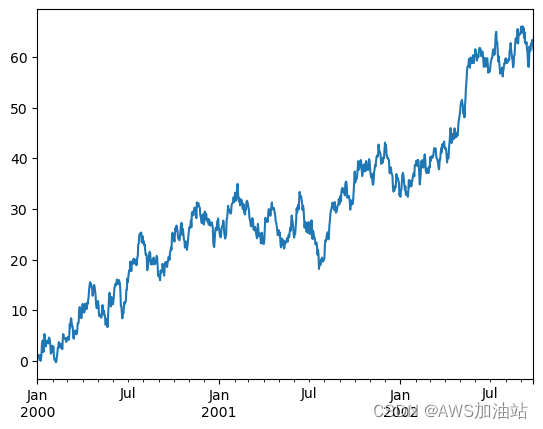
1 2 3 ts = pd.Series(np.random.randn(1000 ),index=pd.date_range('1/1/2000' , periods=1000 )) ts.head()
1 2 3 4 5 6 2000-01-01 0.273730 2000-01-02 0.934832 2000-01-03 -0.142245 2000-01-04 -0.499136 2000-01-05 0.169899 Freq: D, dtype: float64
1 2 3 ts = ts.cumsum() ts.plot() plt.show()
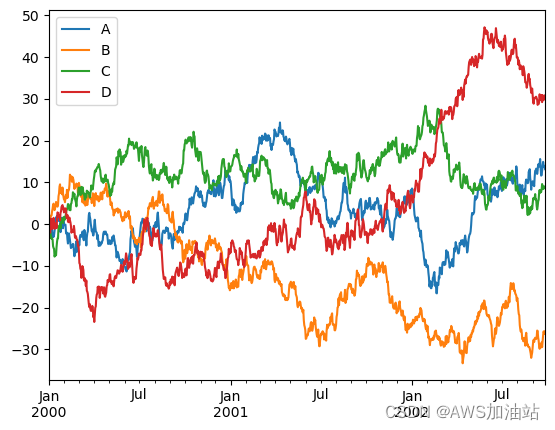
1 2 3 4 df4 = pd.DataFrame(np.random.randn(1000 , 4 ), index=ts.index,columns=['A' , 'B' , 'C' , 'D' ]) df4 = df4.cumsum() df4.head()
A B C D 2000-01-01 -0.847755 1.239531 -0.760856 0.668182 2000-01-02 -1.191067 1.930612 -2.587667 0.075473 2000-01-03 -1.353704 1.815771 -1.788468 -2.039681 2000-01-04 -2.338159 1.734058 -2.269514 -0.756332 2000-01-05 -2.835570 2.067088 -3.396366 1.352672

 微信
微信 支付宝
支付宝